
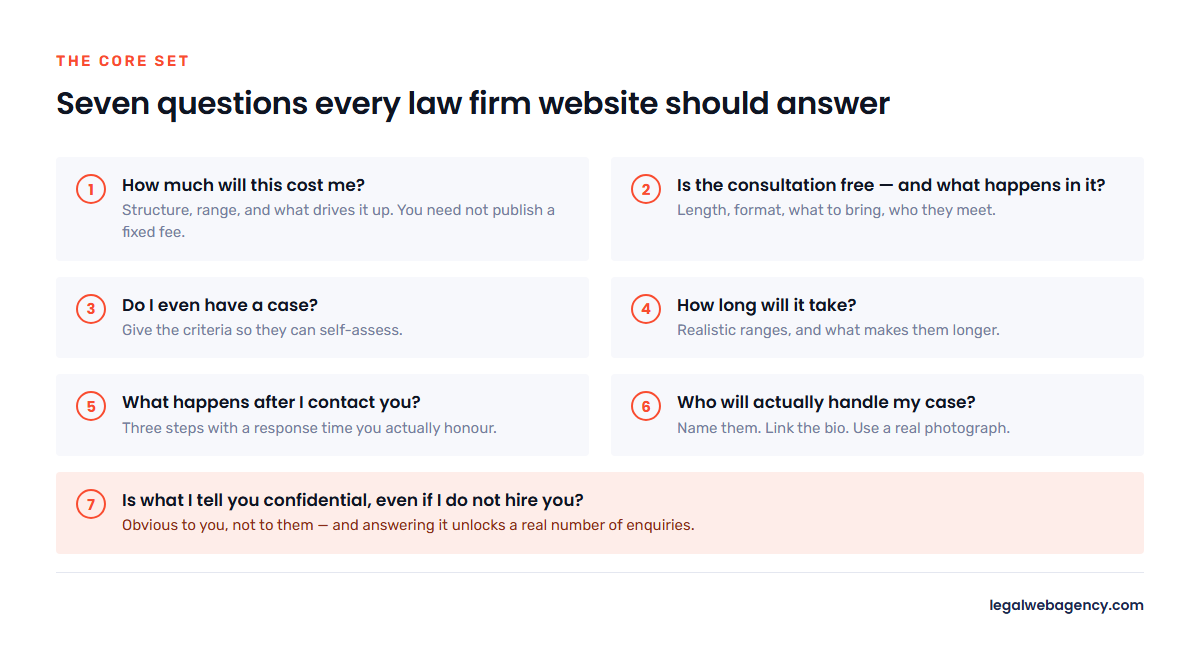
Short answer: Every law firm website should answer the same core set of questions a prospective client asks before they will call: what it costs, whether the consultation is free, how they pay, what happens after they contact you, how long their matter will take, whether they have a case at all, and who exactly will handle it. Answer those seven and you will out-convert most of your competitors, who answer none of them.
The FAQ section on most law firm websites is filler — six questions written by whoever built the site, none of which a real client has ever asked. It exists because the template had a section for it.
Done properly it is one of the highest-return blocks on the whole site. It captures question-shaped searches, it is the format Google pulls featured snippets from, it is what AI assistants quote when someone asks them a legal question, and it removes the specific hesitations that stop somebody dialling. Here is what to put in it.
The seven questions every law firm site must answer
1. How much will this cost me?
The most searched and least answered question in legal marketing. Firms avoid it because the honest answer is “it depends,” and then a directory site with a made-up average outranks them for it.
You do not need to publish a fixed price. You need to answer the structure of the question: is it hourly, flat fee or contingency; what is a typical range for a straightforward matter; what drives the number up; what a retainer looks like. “An uncontested divorce with no children typically runs $1,500 to $3,000. Contested custody starts around $7,500 and depends on how much the other side litigates” is a complete answer that commits you to nothing.
2. Is the consultation free, and what happens in it?
Two questions, and the second one matters more than firms realise. People do not know what a consultation involves. Tell them: how long it lasts, whether it is in person or by phone or video, what to bring, who they will speak to, and whether they will be pressured to sign something. Reducing the unknown is what turns a page view into a call.
3. Do I even have a case?
The question underneath most legal searches. You cannot answer it for a specific person, but you can give them the criteria — the elements, the deadlines, the disqualifiers — so they can self-assess. This builds more trust than any “we fight for you” headline, because it is the first thing on the page that treats them as capable of understanding their own situation.
4. How long will it take?
Give realistic ranges by matter type and say what makes them longer. People are usually planning around the answer — a move, a job, a custody handover — and vagueness here reads as evasiveness.
5. What happens after I contact you?
A three-step process beats any promise. “You submit the form. Someone from our office calls you within one business day. If we can help, we book a 30-minute consultation that week.” Every unanswered step is a reason to close the tab.
And then honour the timeframe you publish. Response time is the single biggest determinant of whether a legal enquiry converts, as we cover in our guide to law firm website conversion rates.
6. Who will actually handle my case?
Clients worry — correctly, sometimes — that they will meet a named partner and then be handed to someone they never see. Say who does the work, who they will speak to day to day, and how they can reach that person. Then link to that attorney’s bio with a real photograph.
7. Is what I tell you confidential, even if I do not hire you?
Obvious to you, not to them. Many people hesitate to describe their situation to a stranger on a website. A plain-language explanation of confidentiality — alongside the standard notice that submitting a form does not by itself create an attorney-client relationship — unlocks a real number of enquiries.
Practice-area questions worth adding
These belong on the relevant practice area page, not on a site-wide FAQ page. Each one is a genuine search someone makes at the moment they need a lawyer.
| Practice area | Questions to answer |
|---|---|
| Personal injury | Do I have to go to court? What is my case worth? How long before I get paid? Who pays my medical bills in the meantime? What if I was partly at fault? What is the deadline to file? |
| Family law | Can I keep the house? How is custody decided in this state? What if my spouse will not agree? Do we both need lawyers? How do I protect my children from the process? |
| Criminal defence | Will this go on my record? Am I going to jail? Should I talk to the police? What happens at the first hearing? Can this be expunged later? |
| Bankruptcy | Will I lose my house or my car? Chapter 7 or Chapter 13? Will my employer find out? How long does it stay on my credit? Which debts survive? |
| Estate planning | Do I need a will or a trust? What happens if I die without one? How often should this be updated? What does probate cost in my state? |
| Employment | Was my firing actually illegal? Can I be retaliated against for complaining? How long do I have to file? Do I have to arbitrate? |
| Immigration | How long is the current wait? What happens if my status lapses? Can I work while this is pending? Will travelling hurt my application? |
The best source for these is not a keyword tool. It is your own intake log. Spend twenty minutes writing down the questions your staff answered on the phone last week — those are the exact questions, in the exact words, that hundreds of other people are typing into Google.
How to write an FAQ answer that gets used
- Phrase the question exactly as a person would say it. “How much does a divorce lawyer cost?” not “Legal Fees and Cost Structures.”
- Answer in the first sentence. Then qualify. A snippet or an AI answer is extracted from the opening, not the middle.
- Keep answers to 40–100 words. Long enough to be complete, short enough to be liftable.
- Use one question per heading. One H3, one question, one answer. Do not bundle three questions under one heading.
- Include a number wherever you honestly can. A deadline, a range, a timeframe. Specifics get quoted; generalities do not.
- Link one relevant answer to the deeper page. The FAQ answers it; the practice area page or the blog post explains it.
- Mind the compliance line. An FAQ answer that describes a past outcome is a past-results claim, and one that predicts a result is a bigger problem. Keep answers informational and add your state’s required disclaimers where relevant — see our guide to law firm website content.
Where FAQs should live
Not all in one place. The structure that works:
- Practice area pages: six to ten questions specific to that matter type, at the bottom of the page. This is where most of the SEO value is.
- A firm-wide FAQ page: the process, fees, consultations and confidentiality questions that apply regardless of matter type.
- Blog posts: any question that needs more than 200 words becomes its own post, which then links back up to the practice area page.
- Attorney bios: one or two questions about how that lawyer works — how they communicate, how often clients hear from them.
A single 40-question page divorced from the rest of the site captures far less than the same questions distributed across the pages they belong to. Our content guide covers how the whole set should link together.
Add FAQ schema — correctly
FAQPage structured data tells search engines that a block of content is a set of questions and answers. It makes the content easier to parse for featured snippets and for AI assistants building an answer.
Three rules, because incorrect implementation is worse than none:
- Only mark up questions and answers that are visible on the page. Marking up content a visitor cannot see is a structured data violation.
- One FAQPage block per page.
- Keep the markup and the page in sync. If you edit an answer, edit the schema. Most SEO plugins handle this automatically if you use their FAQ block rather than hand-writing it.
Validate with Google’s Rich Results Test before you move on. Our law firm website SEO checklist covers the other schema types worth having on a legal site.
Five mistakes that make an FAQ section useless
- Questions nobody asks. “What is our approach to client service?” is not a question. It is a headline wearing a question mark.
- Answers that refuse to answer. “Every case is different, contact us to discuss” is the fastest way to lose a reader who was one sentence away from calling.
- Accordions that hide everything. Fine for usability, provided the content is in the HTML and not loaded on click. If it only exists after a JavaScript event, treat it as invisible to search engines — and do not mark it up as FAQ schema.
- The same FAQ block on every page. Duplicated across twelve practice area pages, it adds nothing and dilutes each one.
- Written once and never revisited. Fees change, deadlines change, procedures change. Review annually; a wrong filing deadline in an FAQ is a genuine risk, not just an SEO problem.
Frequently asked questions
How many FAQs should a law firm website have?
Six to ten per practice area page, plus eight to twelve on a firm-wide FAQ page covering fees, process and confidentiality. Quality beats quantity — ten questions real clients ask outperform fifty invented ones.
Do FAQ pages still help SEO?
Yes, though for a different reason than a few years ago. Google reduced FAQ rich results in ordinary search listings, so expect fewer visible dropdowns. The content itself still captures question-shaped queries, still feeds featured snippets, and is now the format AI assistants most readily quote. Write them for the answer, not for the rich result.
Should FAQ answers be short or detailed?
Answer completely in 40–100 words. If a question genuinely needs 800 words, give it a short FAQ answer and link to a full blog post that covers it properly.
Can I put prices in my FAQ?
Yes, and you should where you honestly can. Ranges are fine. Being one of the few firms in your market that answers the cost question is a durable advantage — just make sure the range is accurate and note what changes it.
Where do I find the right questions to answer?
Your intake calls first — write down what people actually ask. Then Google’s “People also ask” box for your practice area and city, your Search Console query report, and the questions clients email you in the first week of a matter.
Want the version of this built for your practice areas and your state? Tell us what you practise and we will draft the question set you should be answering.