
Short answer: You can build a working law firm website on WordPress in a weekend. Buy a domain, get managed WordPress hosting, install a lightweight theme, build eight core pages, add four plugins, handle your state bar’s advertising requirements, and launch. The build is the easy part — writing pages specific enough to be believed is what takes the real time.
This is the step-by-step version for firms doing it themselves. It assumes no technical background. Where a decision has a long-term consequence, we say so, because most of the expensive mistakes in a DIY law firm site are made in the first hour.
Step 1: Register the domain — in the firm’s name
Use a registrar you control directly, and register it to the firm rather than to an individual or an agency. Firms lose domains this way more often than you would think.
- Prefer the firm name over a keyword domain.
hendersonlawaz.comages better thanphoenixdivorcelawyerpro.com, and exact-match keyword domains carry no ranking benefit any more. - Take the
.com. Clients type it by default regardless of what is on your card. - Turn on auto-renew and registrar lock the day you buy it.
- Keep the domain at a separate registrar from your host, so changing host is never a hostage negotiation.
Step 2: Choose hosting
Managed WordPress hosting at roughly $25–$60 a month is the right default. It handles caching, updates, daily off-site backups and security patching — the four things a firm with no IT staff will otherwise neglect.
The $3 shared plan is a false economy on a site that collects privileged client information through a contact form. Our full breakdown is in how to choose hosting for a law firm website, including the confidentiality obligations that apply to you and not to a restaurant.
Step 3: Install WordPress and lock it down
Almost every host offers one-click WordPress installation. Once it is running, do these five things before anything else:
- Set the site title and tagline. Settings → General. Sites launch with “Just another WordPress site” more often than anyone admits, and it ends up in your search listings.
- Set permalinks to Post name. Settings → Permalinks. Do this before publishing anything — changing it later breaks every URL you have.
- Force HTTPS and confirm the padlock appears.
- Create a real admin account with a strong unique password and two-factor authentication. Never leave the username as “admin”.
- Uncheck “Discourage search engines” in Settings → Reading when you launch. Leaving it checked is the single most common reason a new site never appears in Google.
Step 4: Install a theme
Pick a fast, well-maintained, lightweight theme — Astra, Kadence, GeneratePress or a native block theme — and import a professional starter template. Then replace every word and every image in it.
Avoid heavy multipurpose page-builder themes if you can. They store content in a proprietary format, which means your next redesign is a full rebuild. The reasoning is set out in our comparison of law firm WordPress templates.
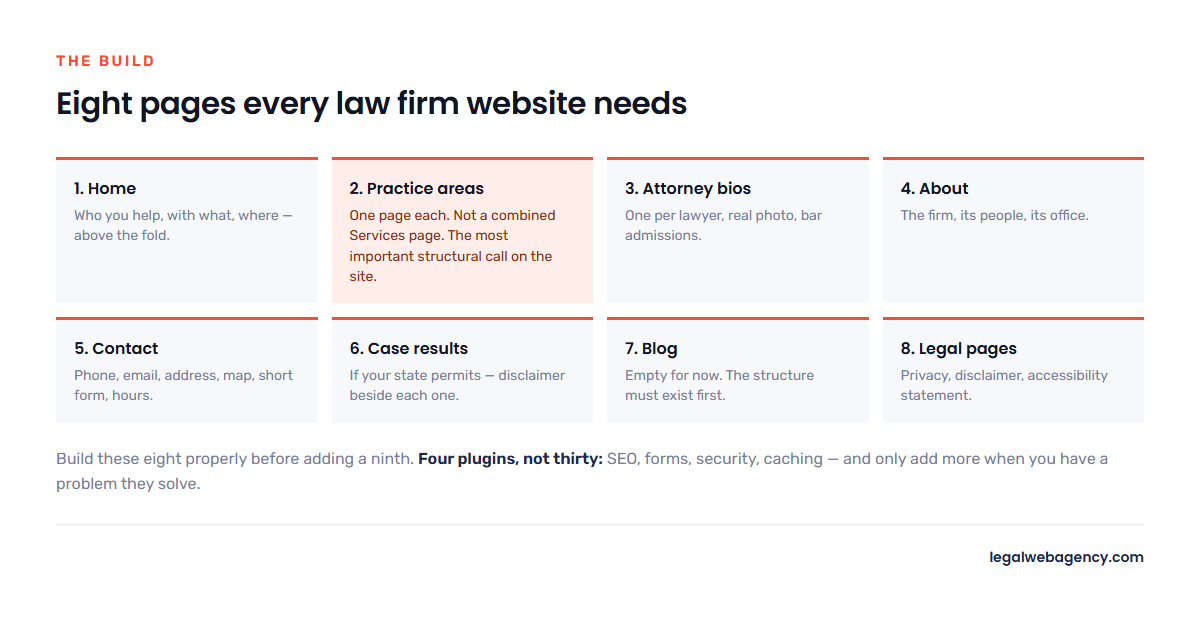
Step 5: Build the eight pages every law firm site needs
Build these in this order. Resist adding more until all eight are genuinely good.
- Home. Who you help, with what, where. Above the fold, in plain language. Not “Excellence in Advocacy Since 1998”.
- One page per practice area. Not a combined “Services” page — one page each for the services you actually want more of. This is the most important structural decision on the site.
- Attorney bios. One page per lawyer, with a real photograph, bar admissions, and something human. These are frequently the most-visited pages on a law firm site.
- About. The firm’s story, its people, its office.
- Contact. Phone, email, address, a map, a short form, and your office hours.
- Case results (if your state permits and you have them), with a disclaimer beside each result.
- Blog. Empty for now. The structure needs to exist before you need it.
- Legal pages. Privacy policy, disclaimer, and an accessibility statement.
For what goes inside each practice area page — process, cost, proof, FAQs — follow our guide to structuring practice area pages.
Step 6: Install four plugins, and no more
Every plugin is code you are trusting and a potential vulnerability. Firms routinely run thirty and wonder why the site is slow. You need four categories:
- SEO — Yoast or Rank Math. Sets your title tags, meta descriptions, sitemap and schema.
- Forms — something reputable, configured so submissions are emailed and not retained forever in the database. A default form plugin quietly stores years of unencrypted case descriptions.
- Security — if your host does not already provide a firewall and malware scanning.
- Caching — only if your host does not do it at server level. Managed hosts usually do.
Skip sliders, popup builders, visitor counters and anything promising instant SEO. Add a plugin only when you have a problem it solves.
Step 7: Handle the compliance layer
No theme or plugin does this for you, and it is the step DIY builds skip. Before launch:
- Firm name and a responsible attorney named on every page, usually in the footer.
- A real office location, city and state at minimum.
- The states where each attorney is licensed.
- “Attorney Advertising” on the home page if you practise in New York.
- Results-vary disclaimers immediately beside any case result or outcome-describing testimonial.
- Issuer, year and methodology beside any award badge — plus the Supreme Court line if you practise in New Jersey.
- A notice on your contact form that submitting it does not create an attorney-client relationship.
Full state-by-state detail is in attorney advertising rules by state.
Step 8: Pre-launch checklist
- Every page has a unique title tag and meta description.
- Test every form from an outside network and confirm it arrives in a monitored inbox.
- Click-to-call works on a real phone, not just in the desktop preview.
- Run the site through Google PageSpeed Insights on mobile and fix anything obvious.
- Compress every image. Unoptimised hero images are the number one cause of a slow law firm site.
- Search engine visibility is switched ON.
- Google Search Console and Analytics connected, sitemap submitted.
- Read every page aloud once. You will catch the placeholder text nobody else did.
Step 9: After launch
Launching is the start. In the first month: claim and verify your Google Business Profile, ask five past clients for reviews, and publish two pages answering questions your clients actually ask on the phone.
Set expectations on timing — a new domain takes months, not weeks, to establish itself. We break the realistic curve down in how long it takes to rank a law firm website.
When DIY stops making sense
Honestly: building it yourself is a legitimate choice for a solo or new firm, and we would rather you did it well than paid someone badly. Hand it over when the hours you are spending are worth more billed, when you need a migration without losing rankings, or when the site is live but simply not producing calls — that last one is a conversion problem, not a build problem, and it is covered in our guide to law firm website conversion rates.
Frequently asked questions
How long does it take to build a law firm website on WordPress?
A weekend for the technical build. Two to four weeks realistically, because writing eight pages of specific, honest content is the slow part. Firms that finish in a weekend usually have eight pages of generic content.
How much does it cost to build it yourself?
Roughly $15–$20 a year for the domain, $300–$700 a year for decent hosting, and $0–$250 for a theme. Under $1,000 in year one. Compare that against professional builds in our pricing breakdown.
Is WordPress the right platform for a law firm?
For most firms, yes. You own the site outright, you can move host or developer without rebuilding, and the pool of people who can work on it is enormous. Hosted website builders are simpler on day one and harder to leave on day one thousand.
Do I need a developer?
Not for a standard brochure site. You need one for custom functionality, a migration with existing rankings at stake, or an integration with your practice management system.
Building it yourself and want a second pair of eyes before you launch? Send us the staging URL. We will tell you what we would fix, free.