
Short answer: Probably not. Most law firm websites fail basic accessibility checks — usually on colour contrast, missing image alt text, unlabelled forms and keyboard navigation. US courts have generally treated websites of businesses open to the public as covered by the ADA, and website accessibility lawsuits run into the thousands each year. The practical standard to build to is WCAG 2.1 Level AA, and most of the common failures take a developer a day to fix.
Lawyers respond to liability framing more readily than to design arguments, so let us start there: a demand letter over an inaccessible website is a bad look for a law firm specifically. It is also entirely avoidable, and the same fixes make the site work better for the older clients who make up a large share of estate planning, elder law and personal injury enquiries.
Where the legal exposure comes from
The ADA itself predates the web and does not name websites. What has developed instead is a body of litigation under Title III, which covers places of public accommodation. Courts have divided on how directly that applies to a website with no physical location, but the practical position for a law firm with an office is straightforward: assume you are covered.
Two further points worth knowing:
- Most matters never reach a court. The common pattern is a demand letter proposing settlement for an amount calculated to be cheaper than defending. Firms settle, remediate, and it never appears in a reported decision — which is why the volume is larger than the case law suggests.
- State law adds exposure. California’s Unruh Act in particular has been used extensively in website accessibility claims, and several other states have their own accessibility statutes.
This article is general marketing and technical guidance, not legal advice on your own exposure. If you want an opinion on your firm’s risk, that is a question for counsel who practises in this area.
The standard you actually build to: WCAG 2.1 AA
Because the statute does not specify a technical standard, the Web Content Accessibility Guidelines have become the reference point used in settlements, consent decrees and procurement requirements. Level AA is the practical target — Level A is too low and Level AAA is not realistic for a marketing site.
WCAG organises requirements under four principles, which are more useful than they sound as a checklist: content must be perceivable, operable, understandable and robust.
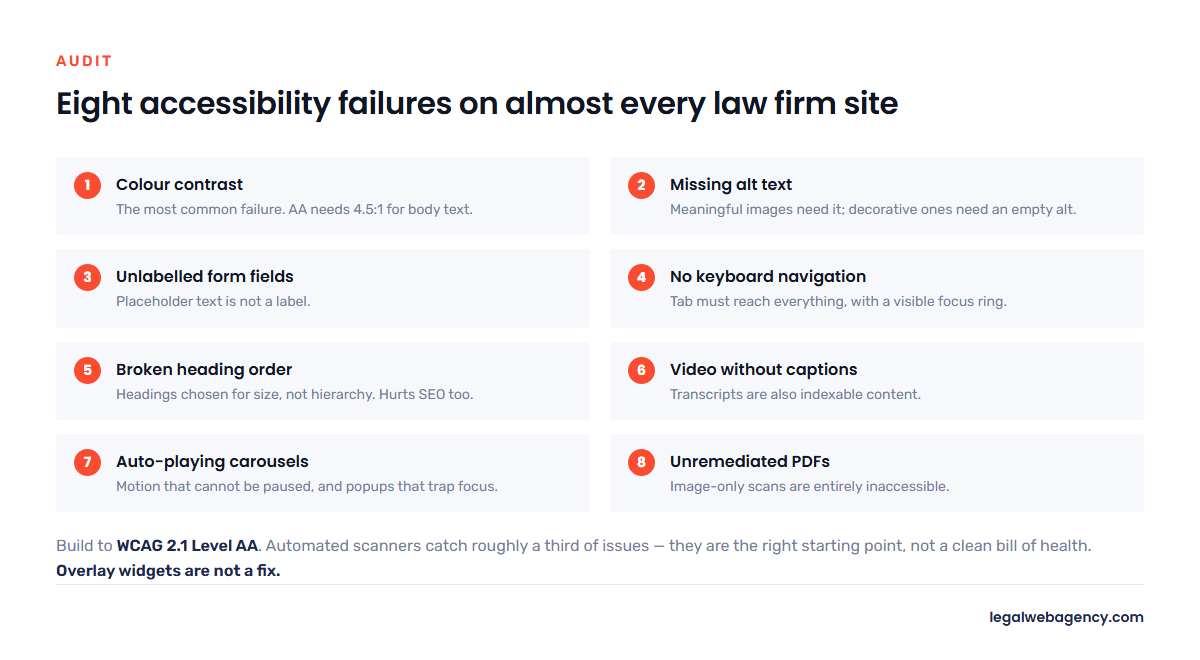
The eight failures we find on almost every law firm site
- Insufficient colour contrast. The most common failure by a wide margin. Light grey body text on white, or white text on a mid-tone brand colour. WCAG AA requires a contrast ratio of at least 4.5:1 for normal text and 3:1 for large text. Many law firm templates ship failing this out of the box.
- Missing image alt text. Every meaningful image needs a text alternative describing what it conveys. Decorative images should carry an empty alt attribute so screen readers skip them — not a filename.
- Unlabelled form fields. Placeholder text is not a label. A contact form whose fields are identified only by placeholders is unusable with a screen reader, and it is the single field most likely to cost you an enquiry from a disabled visitor.
- No keyboard navigation. Everything clickable must be reachable and operable with the Tab key alone, in a logical order, with a visible focus indicator. Many themes deliberately remove the focus outline because designers dislike it.
- Broken heading structure. One H1, then H2s and H3s in order. Page builders frequently emit headings chosen for size rather than hierarchy, which turns a screen reader’s page outline into nonsense — and incidentally harms your SEO.
- Video without captions. Attorney introduction videos and client testimonials need captions, and ideally a transcript. A transcript is also indexable content, so this one pays for itself.
- Auto-playing carousels and popups. Moving content that cannot be paused fails WCAG, and popups that trap keyboard focus fail it badly. Chat widgets are frequent offenders.
- PDFs nobody remediated. Firms publish scanned intake forms and guides as image-only PDFs, which are entirely inaccessible. If it matters, publish it as a web page instead.
How to check your own site in twenty minutes
- Run an automated scanner. WAVE or the axe DevTools browser extension, on your home page, one practice area page and your contact page. Free, and catches contrast, alt text and label problems immediately.
- Run Lighthouse. Built into Chrome. Its accessibility score is a rough signal, not a verdict.
- Unplug your mouse. Genuinely. Navigate your own site with Tab and Enter only, and try to submit the contact form. Most firms discover something within a minute.
- Turn on a screen reader — VoiceOver on a Mac, Narrator on Windows — and listen to your home page. Uncomfortable, and by far the most educational fifteen minutes available.
- Zoom to 200%. Text must remain readable without horizontal scrolling.
Automated tools catch roughly a third of accessibility issues. They are the right starting point and not a clean bill of health.
Why accessibility overlays are not the fix
You will be sold a one-line JavaScript widget promising instant ADA compliance for a monthly fee. Be sceptical. Overlays sit on top of the site and attempt to patch problems at runtime rather than fixing the underlying markup.
- Accessibility advocates and screen reader users have criticised them extensively, and many people who rely on assistive technology report that overlays make sites harder to use.
- Installing one has not reliably prevented demand letters — sites running overlays have themselves been the subject of claims.
- A vendor “compliance certificate” is a marketing document, not a legal defence.
The durable fix is to correct the markup: contrast, alt text, labels, focus states, heading order. It costs more once and nothing thereafter.
The commercial argument, since the legal one is only half of it
Roughly one in four US adults has some form of disability, and the proportion rises steeply with age. That population is over-represented in exactly the practice areas where clients arrive after an injury, an illness, or in later life — personal injury, medical malpractice, estate planning, elder law, social security disability.
Every accessibility fix in the list above also helps everyone else. Better contrast helps anyone reading on a phone in daylight. Proper form labels reduce submission errors. Captions get watched in silence on public transport. Clean heading structure is the same thing search engines and AI assistants use to understand your page — the overlap with our law firm website SEO checklist is nearly total.
What to do this week
- Run WAVE on three pages and write down what it finds.
- Fix contrast and alt text yourself — both are usually editable without a developer.
- Have whoever maintains the site fix form labels, focus indicators and heading order.
- Add captions to any video.
- Publish an accessibility statement saying what standard you aim for and giving a contact route for anyone who hits a barrier. It is good practice, and it demonstrates intent.
- Put a re-check in the calendar for every six months, and before any redesign.
Frequently asked questions
Does the ADA apply to law firm websites?
Courts have generally treated websites of businesses open to the public as covered under Title III, though they have divided on websites with no physical premises. For a law firm with an office, the safe working assumption is that you are covered — and state statutes such as California’s Unruh Act add further exposure.
What standard does my law firm website need to meet?
WCAG 2.1 Level AA is the practical target. It is the standard most commonly referenced in settlements and procurement requirements, even though the ADA itself specifies no technical standard for private businesses.
Do accessibility overlay widgets make my site compliant?
No. They patch symptoms at runtime, are widely criticised by the people who actually use assistive technology, and sites running them have still received demand letters. Fix the underlying markup instead.
How much does it cost to make a law firm website accessible?
For a typical brochure site, usually a day or two of developer time for the common failures, plus your own effort on alt text and captions. Building it in from the start on a new site costs essentially nothing extra — which is the argument for raising it before a redesign rather than after.
We build to WCAG 2.1 AA as standard and check it before launch. Send us your URL and we will run an accessibility scan and tell you what is failing, free.