
Short answer: A practice area page should target one service in one place, answer the question the searcher actually typed within the first hundred words, and give a prospective client enough specific detail to believe you handle this exact problem regularly. One page per practice area, one page per city you genuinely serve, and never both mixed into a single page. That structure is what separates firms that rank from firms that have a “Services” page and nothing else.
Practice area pages are the most valuable real estate on a law firm website and the most consistently wasted. The typical version is 300 words of restated definition — “Divorce is the legal dissolution of a marriage” — followed by a call button. It ranks for nothing, because it says nothing a prospective client could not get from Wikipedia, and it converts poorly for the same reason.
This guide covers how to decide which pages to build, how to structure each one, what to write in each section, and the mistakes that quietly cap the whole set.
Why practice area pages matter more than your home page
Nobody searches for your firm. They search for their problem. “Do I need a lawyer for a DUI in Ohio,” “how much does a custody lawyer cost,” “wrongful termination attorney near me” — every one of those queries has an answer that lives on a practice area page, not on a home page.
Three consequences follow:
- Practice area pages are your entry points. On most law firm sites that rank at all, the majority of organic landings happen on a practice area page, not the home page.
- They carry commercial intent. Someone reading “what happens at a custody hearing” is researching. Someone reading your custody page is choosing.
- They are where topical authority is built. Google associates a domain with a subject through a cluster of pages, not one page. Missing practice area pages is one of the most common SEO mistakes attorneys make, and it caps everything downstream of it.
Step 1: Decide which pages you actually need
The rule is simple and firms break it constantly: build a page for every service you genuinely want more of, and no page for anything else.
A four-lawyer family firm does not need seventeen practice area pages. It needs divorce, custody, child support, property division, and possibly modifications and paternity. Those six pages, written properly, will outperform seventeen thin ones every time — and the seventeen create an internal competition problem where Google cannot tell which page answers “family lawyer.”
Split by how clients self-identify, not by how you bill
This is the single most useful structural principle in this article. Your practice management software may classify everything as “family law.” Your clients do not think of themselves as family law clients. They think of themselves as someone whose spouse just filed, or someone about to lose weekend access to their kids. Those are different searches, different fears and different pages.
The same logic applies everywhere. Bankruptcy splits into Chapter 7 and Chapter 13 because filers self-identify by chapter. Personal injury splits into car accidents, truck accidents, slip and fall, and wrongful death because a person searches for the thing that happened to them. We cover this in more depth in our family lawyer website design guide and the bankruptcy equivalent.
Keep service pages and location pages separate
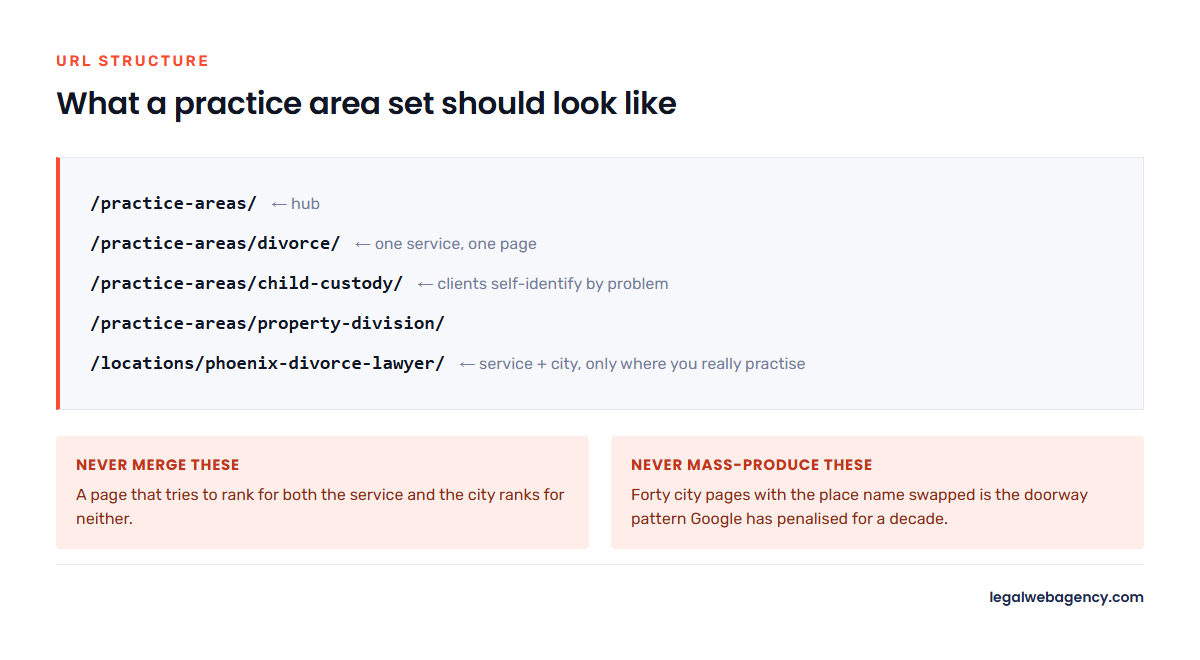
A practice area page answers what. A location page answers where. Merging them into one URL that tries to rank for both produces a page that ranks for neither.
The structure that works:
/practice-areas/                     ← hub
/practice-areas/divorce/             ← service page
/practice-areas/child-custody/       ← service page
/locations/phoenix-divorce-lawyer/   ← service + city, only where you really practise
And the caveat that firms ignore: only build a city page for a city where you have a genuine presence — an office, an attorney who regularly appears in that courthouse, real cases. Forty near-identical city pages with the place name swapped is the doorway-page pattern Google has penalised for over a decade.
Step 2: The structure of a practice area page that ranks
Use this order. It matches how a worried person reads, and it puts the liftable answer where search engines and AI assistants look for it.
H1: the service and the place, phrased as a person would say it
“Child Custody Lawyers in Mesa, Arizona” beats “Child Custody — Comprehensive Family Law Representation.” One matches a search. The other matches an internal memo.
Opening paragraph: answer the question in the first sixty words
Before any preamble about your commitment to excellence. State plainly what you do, who you do it for, and what happens next. This paragraph is what Google lifts for a featured snippet and what an AI assistant quotes when someone asks it to recommend a lawyer. If your answer sits in paragraph six, it does not exist.
The specifics that prove you do this
This is the section that separates a real page from a template. Name the courthouse. Name the judges’ standing orders you work around. Name the filing deadlines in your state. Reference the local practice: how long a temporary orders hearing typically takes in your county, what the mediation requirement is, which forms the clerk rejects most often.
A competitor can copy your headline. They cannot copy the fact that you know the Maricopa County Superior Court self-service centre closes at four.
The process, step by step
What happens after they call. Consultation, retainer, filing, discovery, resolution — with realistic timeframes. Anxiety is the emotion driving the search, and a timeline is the cheapest way to reduce it. It also captures a large family of “how long does X take” queries.
Cost, honestly
Every practice area has a cost query attached to it and most firms refuse to answer it, which is why directory sites outrank them for it. You do not need to publish a fixed fee. A range, the structure (hourly, flat, contingency), what drives the number up, and what a retainer typically looks like is enough to satisfy the search and to filter out the people who were never going to hire you.
Proof
Case results relevant to this practice area, testimonials from this practice area, and the attorney who actually handles it with a photo and a link to their bio. Generic firm-wide proof at the bottom of every page reads as generic. Mind the disclaimer requirements — results and outcome-describing testimonials carry obligations in most states, which we cover in our guide to law firm website content and in our state-by-state guide to attorney advertising rules.
FAQ block
Six to ten real questions, each with a direct answer in the first sentence. Take them from your intake calls, not from a keyword tool — the questions clients actually ask are more specific and less contested than the ones tools surface. Mark this section up with FAQPage schema.
One clear next step
One primary action, repeated. Not a phone number in the header, a form in the sidebar, a chat bubble, a “download our guide” banner and a newsletter signup all competing. Pick the action you want and make everything else secondary.
Step 3: Write the page so it does not read like every other page
Four habits do most of the work.
- Write to one person, not to a market. Second person, present tense. “If you have been served with divorce papers, you have twenty days to respond” beats “Our firm represents clients in dissolution proceedings.”
- Lead every section with the answer. Then explain. Reverse-pyramid structure is what makes a passage quotable by an AI assistant and skimmable by a frightened human.
- Use the words your clients use. They search “custody,” not “parenting time allocation.” Use their term as the primary and yours as the secondary.
- Put one thing on the page nobody else has. A photograph of your actual office. A screenshot of the county’s filing portal. A number from your own caseload. A table of local deadlines. One genuine specific is worth a thousand words of adjectives.
How long should a practice area page be?
Long enough to answer the question completely and no longer. In practice, a competitive practice area page usually lands between 1,200 and 2,000 words, because that is roughly what it takes to cover process, cost, proof and objections properly. Word count is a symptom of thoroughness, not a target — padding a 400-word page to 1,500 with restated definitions helps nothing.
Step 4: The technical setup, done before you publish
- URL: short, readable, keyword-bearing.
/practice-areas/child-custody/— not/pa/?id=14. - Title tag: service, city, firm. Around 55–60 characters.
- Meta description: the promise plus the action, around 150 characters. It does not affect rankings; it affects whether anybody clicks.
- One H1, then a logical H2/H3 hierarchy. Headings are the outline an AI assistant reads to decide what the page covers.
- Schema: LegalService or Attorney on the page, FAQPage on the FAQ block, and consistent NAP details matching your Google Business Profile.
- Internal links: up from the page to the practice hub, sideways to genuinely related services, and down to any supporting blog posts. Every page you publish should link to at least three others and be linked to from at least two.
- Image alt text that describes the image, and compressed files. Practice area pages are usually the slowest pages on a law firm site because of a hero image nobody optimised.
Our law firm website SEO checklist covers the site-wide version of this list.
Two things sit either side of this work. Before you add pages, check whether the ones you have are already competing for the same searches, which a law firm website content audit will find in about two hours. And if the writing itself is the bottleneck, law firm website content writing covers what a legal copywriter costs and the four tests that tell you whether a draft is worth paying for.
The five mistakes that cap a practice area set
- Duplicate pages competing with each other. Two pages targeting “employment lawyer website” split the signal and Google picks neither. If you have near-duplicates, merge them and redirect — consolidation is almost always faster than writing another page.
- Everything crammed onto one Services page. A single page cannot rank for eight different services. Split it.
- Thin city pages. Same 500 words, different place name, forty times over. This is the fastest way to devalue an otherwise healthy site.
- No internal linking. A practice area page published as an orphan inherits nothing from the rest of the site and takes far longer to rank, if it ever does.
- Never touching them again. Statutes change, fee structures change, the courthouse moves. A practice area page that has not been reviewed in three years is a liability on both fronts.
Practice area pages also do not stand alone. The visitor who finishes one usually goes looking for the person who would handle the case, which makes the attorney bio page the next page to get right.
Frequently asked questions
How many practice area pages should a law firm website have?
One for each service you genuinely want more of. For most small firms that is between four and eight. More pages than you have real expertise to fill produces thin content that drags down the pages you care about.
Should practice area pages be blog posts or pages?
Pages. They are permanent commercial assets with a stable URL, not dated commentary. Blog posts support them — a post answering “how long does a custody case take in Arizona” should link up to the custody page.
Can I use AI to write my practice area pages?
For structure and first drafts, yes. For the finished page, not on its own — a generated page contains only what is already common knowledge on the web, which is precisely the material that does not differentiate you. The parts that make the page rank and convert are the local specifics only your firm has. Write those yourself.
How long until a new practice area page ranks?
On an established domain with internal links pointing at it, typically a few weeks to see movement and three to six months to settle. On a new domain it takes considerably longer. We break the timeline down in how long it takes to rank a law firm website.
If you would like a second opinion on your current practice area structure — which pages are competing with each other and which ones are missing entirely — send us your URL and we will map it out.